
How to Clean Your Phone and Keyboard Safely and Effectively
Keeping your phone and keyboard clean is essential for both hygiene and device longevity. These frequently used gadgets tend to accumulate dirt, oils, and germs over time, which can affect their performance and your health. However, cleaning them improperly can cause damage. In this post, we’ll guide you through safe and effective ways to clean your phone and keyboard, using materials you likely have at home.
Why Cleaning Your Devices Is Important
Your phone is with you almost all day, exposed to different environments. Likewise, your keyboard gets touched by your hands repeatedly throughout the day. Germs, dust, and debris can build up fast and may even contribute to allergies or illness. Regular cleaning helps:
– Remove bacteria and viruses
– Prevent dust buildup that can affect performance
– Keep your devices looking new
What You Will Need
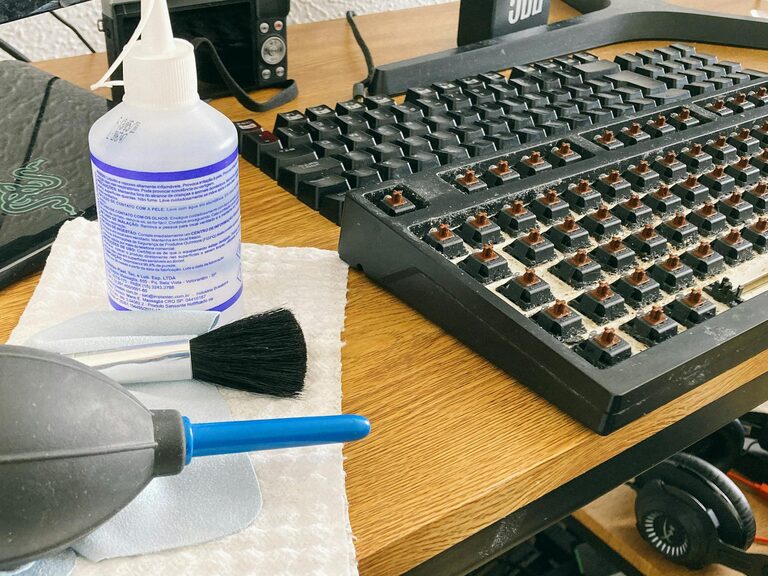
Before you start, gather the following cleaning supplies:
– Soft microfiber cloths
– Cotton swabs or toothpicks
– Isopropyl alcohol (70% or less) or disinfectant wipes safe for electronics
– Distilled water
– Small brush (like a clean paintbrush or toothbrush)
– Compressed air can (optional)
Avoid harsh chemicals like bleach, ammonia, or window cleaners, as they can damage screens and finishes.
—
How to Clean Your Phone Safely
Step 1: Power Off Your Phone
To prevent any damage while cleaning, turn off your phone and unplug any accessories.
Step 2: Remove the Case and Accessories
Take off cases, screen protectors, and any attachments. Clean these items separately based on their manufacturer instructions, often with warm soapy water.
Step 3: Clean the Screen and Body
– Lightly dampen a microfiber cloth with a 50/50 mixture of distilled water and isopropyl alcohol.
– Gently wipe down the screen and body, avoiding ports and openings.
– For stubborn spots, use the damp cloth with a bit more pressure but don’t scrub harshly.
Step 4: Clean Small Areas
Use a dry cotton swab to clean around buttons, camera lenses, and speaker grills. For tiny crevices or ports, compressed air can help blow out dust.
Step 5: Dry Completely Before Use
Make sure your phone is fully dry before plugging it back in and powering on.
—
How to Clean Your Keyboard Safely
Step 1: Turn Off and Unplug
If you use a desktop keyboard, disconnect it. For wireless keyboards, switch them off and remove batteries if possible.
Step 2: Remove Loose Debris
Turn the keyboard upside down and gently shake or tap to dislodge crumbs and dust. Use compressed air to blow out debris trapped under keys.
Step 3: Clean Keycaps and Surface
– Lightly moisten a microfiber cloth with a diluted isopropyl alcohol solution or use disinfectant wipes safe for electronics.
– Wipe the surface and keys carefully, avoiding excess moisture that can seep beneath keys.
– For tight spaces, use cotton swabs or a small brush dipped lightly in alcohol to clean between keys.
Step 4: Deep Cleaning (Optional)
If your keyboard keys are removable, consider taking off keycaps to clean individually with warm, soapy water. Make sure they are completely dry before reattaching.
Step 5: Let It Dry Before Use
Allow the keyboard to air dry fully to avoid moisture damage.
—
Tips to Keep Your Devices Clean Longer
– Wash your hands before using devices
– Avoid eating or drinking near your phone and keyboard
– Clean devices regularly, ideally once a week
– Use keyboard covers or phone cases that are easy to clean
– Store devices in clean, dust-free areas when not in use
—
Final Thoughts
Cleaning your phone and keyboard doesn’t have to be complicated or risky. With simple tools and careful steps, you can keep your devices hygienic and functioning well. Regular maintenance extends the life of your gadgets and contributes to a healthier environment.
Remember, gentle cleaning with the right materials is key to avoiding damage while removing germs and dirt. Make it a habit and enjoy your fresh, clean tech every day!
